
BIM Modeling
MEP BIM Services
Coordinated Revit models of your mechanical, electrical, plumbing, and fire-protection systems: ductwork, piping, cable tray, and equipment, clash-checked against architecture and structure before construction.
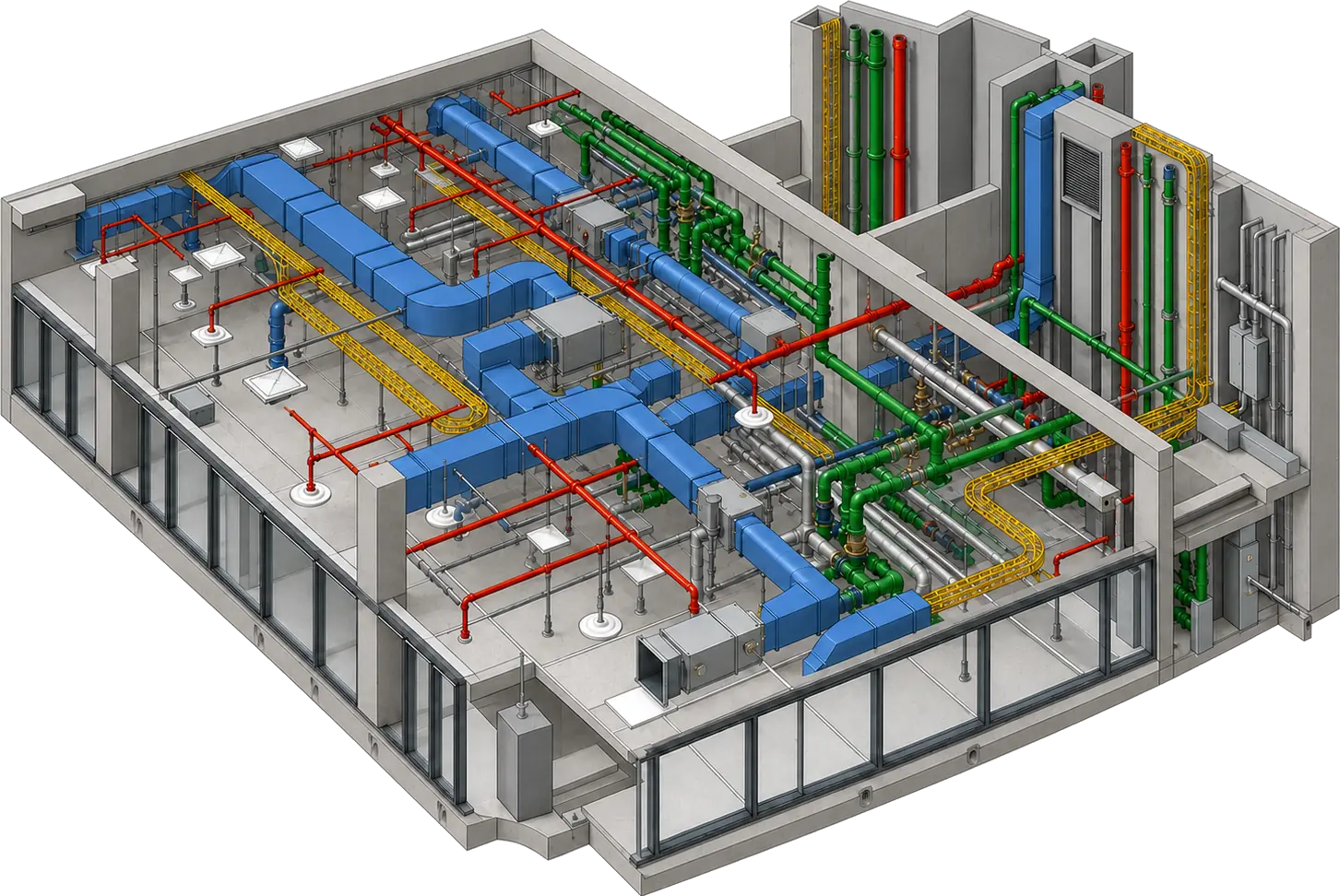
MEP BIM
MEP systems we model
Supply Air Ducts Return Air Exhaust Air Chilled Water Heating Hot Water Domestic Cold Water Domestic Hot Water Sanitary Drainage Medical Gas
Storm Drainage Fire Sprinklers Fire Alarm Cable Tray Conduit Runs Lighting Layouts Power Distribution Low-Voltage Systems Gas Piping
Overview
What is MEP BIM?
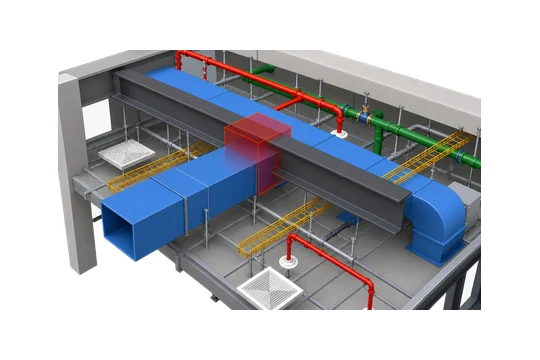
MEP BIM is the 3D modeling of a building's mechanical, electrical, plumbing, and fire-protection systems, where each component carries its own data. Instead of flat 2D lines, every duct, pipe, cable tray, panel, and fixture has a size, elevation, and system type, and sits in coordinated space so the services fit together before anything is installed.
Because the model carries geometry and data, it federates with the architectural and structural models and exposes clashes on screen instead of on site. Architects, engineers, contractors, and facility teams work from that one model, which also drives quantities, spool drawings, and prefabrication.
For our MEP BIM services, we work in Autodesk Revit and model each discipline to the Level of Development (LOD) your BIM Execution Plan calls for, from early design intent through fabrication-ready detail. You get back a clash-checked federation ready for coordination and construction.
Coordinated services
Duct, pipe, tray and fire→fit before install
What we deliver
What's included in our MEP BIM modeling services
Every discipline is modeled to your BEP and handed back federated and clash-ready: ductwork, piping, cable trays, equipment, and fixtures, with the sheets and schedules the model generates.
-
Mechanical / HVAC Model
Ductwork, diffusers, AHUs, VAV boxes, and chilled and heating hot water piping, modeled at real sizes and elevations.
-
Electrical Model
Cable trays, conduit, panels, power distribution, and lighting routed and coordinated with the other services.
-
Plumbing Model
Domestic water, sanitary, and vent piping with fixtures, coordinated through the building, with drain lines sloped.
-
Fire Protection Model
Sprinkler mains, branch lines, and heads modeled from the layout you send and coordinated for clearance.
-
Equipment & Fixtures
Pumps, tanks, panels, and fixtures placed as data-rich Revit families ready for schedules.
-
MEP Coordination
All four MEP disciplines federated with the architecture and structure models and tested for clashes together.
-
Sheets, Schedules & Spools
Plans, sections, equipment schedules, and model-based quantity takeoffs for cost estimating, plus LOD 400 spool drawings.
The four disciplines
MEP modeling by trade
We build every MEP BIM package discipline by discipline, routing and coordinating each system's elements, then federate the models.
Mechanical / HVAC
Supply, return, and exhaust ductwork and hydronic piping, modeled with real sizes and connected to the equipment they serve.
Electrical
Power and lighting distribution routed for clearance and access, and coordinated with the other trades.
Plumbing
Domestic water, sanitary, storm, and vent piping modeled with drainage slopes, fittings, and fixture connections.
Fire Protection
Fire sprinkler piping modeled from your layout, with clearance held to ducts, cable trays, and structure.
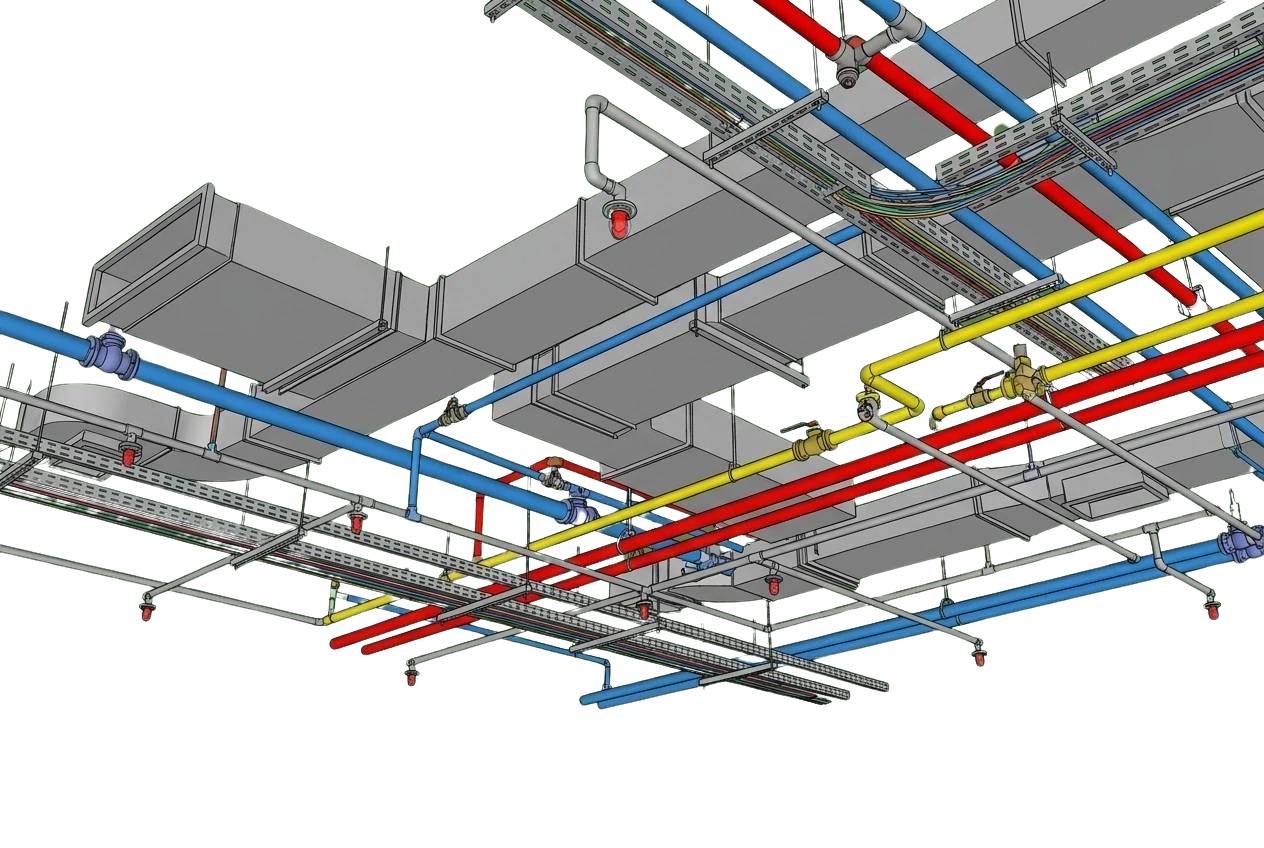
Why it matters
Why is MEP BIM necessary?
MEP is where the building gets crowded. Ducts, pipes, trays, and sprinklers all fight for the same ceiling space, and in flat 2D drawings those conflicts stay hidden until the trades are on site. Modeling the services in coordinated 3D moves that fight onto the screen, where it costs a mouse click to fix instead of a change order.
A coordinated model also becomes the single source for quantities, prefabrication, and installation sequencing, so the whole team works from the same clash-checked picture.
-
Early clash detection finds service conflicts in the model, before they turn into rework during installation.
-
It supports prefabrication and spool drawings, so sections can be built off site and installed faster.
-
Quantities come straight from the model, giving reliable material takeoffs for pricing and procurement.
-
Services stay clear of structure, with the required clearances held at beams, slabs, and openings.
-
It coordinates with the architecture and structure models so every discipline agrees on the same space.
-
Installation on site goes faster because the routing is resolved before the trades arrive.
Where it applies
Industries We Serve
-
01
MEP Engineers
Modeling support that turns your calculations and design intent into coordinated Revit systems.
-
02
MEP Contractors
Clash-checked MEP models and coordinated sheets your install crews can work from on site.
-
03
General Contractors
Federated MEP models that keep coordination and the construction schedule on track.
-
04
Government & Public Sector
MEP models for government and public-sector projects, built to each agency's BIM requirements.
-
05
Facility Owners
As-built MEP models with COBie data for facility handover, asset management, and future fit-outs.
-
06
Prefabrication Shops
LOD 400 models and spool drawings ready to drive off-site fabrication.
-
07
Industrial Facilities
Coordinated ductwork, piping, and cable tray routed around structure and large equipment.
How it works
Our MEP BIM Modeling Process
01
Confirm Inputs, LOD & BEP
We review your drawings, specs, and BIM Execution Plan, then agree on the disciplines and LOD.
02
Model Each MEP System
We build the mechanical, electrical, plumbing, and fire-protection models in Revit.
03
Federate & Clash-Check
We combine the disciplines with architecture and structure and run clash detection in Navisworks Manage.
04
Resolve & QA
We resolve conflicts, hold clearances, and check the model against your standards.
05
Deliver in Your Formats
We hand back the clash-ready model in RVT, IFC, and NWD with sheets and schedules.
Why Arcengine
Why Choose Us
Clash-Aware Modeling
We model with coordination in mind, so services fit and conflicts are resolved before site work begins.
Prefab-Ready Output
LOD 400 models and spool drawings that drive off-site fabrication and faster installation.
Works to Your BEP
Your templates, families, naming rules, and shared parameters, followed exactly.
A Team of 70+
MEP modelers in Revit and Navisworks, part of a team logging 150K+ production hours a year.
Fixed Price, Deadlines Kept
A fixed-price quote before work starts, and delivery on the dates we agree.
Confidential & Secure
We sign NDAs on request. Your models and project data stay private.
Explore more
Our Other Services
FAQs
Frequently Asked Questions
MEP BIM includes coordinated 3D models of a building's mechanical, electrical, plumbing, and fire-protection systems. That covers ductwork, hydronic piping, air handlers, and VAV boxes; cable trays, conduit, panels, lighting, and low-voltage systems; domestic water, sanitary, and vent piping with fixtures, plus medical gas piping; and sprinkler mains, branches, and heads. We build each discipline in Revit to your LOD and federate it for clash detection.
Every MEP BIM project gets a fixed-price quote before modeling starts. The price depends on which MEP trades are in scope, the target LOD (spool-ready LOD 400 takes more modeling than LOD 300), and whether we work from drawings, models, or scans. If you'd like to see our work first, we can begin with a pilot on one of your real sheets or models, turned around in 48 hours.
We model in Autodesk Revit and deliver the native RVT file, an IFC export for teams working in other BIM software, and an NWD file for federated review and clash checking in Navisworks. Plans, sections, and equipment schedules come set up as sheets inside the Revit model.
We model MEP systems from LOD 100 to LOD 400, as your BIM Execution Plan specifies. In the BIMForum LOD Specification, LOD means Level of Development. At LOD 300, each element has a specific size, shape, location, and orientation. LOD 350 adds the supports and connections needed to coordinate with nearby elements, and LOD 400 adds the fabrication and installation detail that spool drawings depend on.
Yes. We federate the MEP models with the architecture and structure, run hard and clearance clash tests, and resolve conflicts in the model before installation. You receive both the NWD and the RVT. For clash testing on models you already have, see clash detection; for coordination across every trade, see BIM coordination.
Yes. We build MEP models from 2D CAD drawings, PDF markups, specifications, design intent, and point-cloud scans of existing conditions. Scans let us model exposed ductwork and piping where they actually run, not where old drawings show them. See Scan to BIM and CAD to BIM for those workflows.
Yes. We work to ISO 19650 for information management, and we follow your BIM Execution Plan, Revit templates, families, naming rules, shared parameters, and LOD requirements. Before full production, a pilot on one of your real sheets or models lets you check our output against those standards.
Yes. We'll sign an NDA before you share files. Your CAD drawings, scans, Revit models, and other project data are handled in strict confidence and managed securely from the day you send them through final delivery.
Get in touch
Coordinated MEP, clash-checked
Send your CAD drawings, design intent, or scans of existing conditions. We'll confirm the scope and BEP, quote a fixed price, then return the federated MEP model in RVT, IFC, and NWD.